Geotag photos online
Geotag photos and videos, with AI
Add the location, a title, a description and keywords to up to 100 files at once. Then download them or post them to your Google Business Profile.
Pro free for 7 days, then the free version. No card needed.

Map data ©2026 Google, INEGI
Everything to geotag photos in bulk
One page, a few steps, and your photos are ready for your website, your customers or Google.
Up to 100 files at once
Geotag a whole shoot in one go: one location for all, or random points around a place.
AI writes the details
Titles, descriptions, keywords and file names for every photo, in your words. You check them before anything is saved.
Photos and videos
JPG, HEIC, PNG and WebP photos up to 100 MB, MP4, MOV and M4V videos up to 250 MB.
ZIP in, ZIP out
Upload a ZIP of your photos and videos, and download all finished files as one ZIP.
Stamp and watermark
Print the title, date, coordinates or your own text visibly onto each photo, with a preview first.
Post to Google Business Profile
Turn each photo into a Business Profile post, with its description as the text, without leaving GeoImgr AI.
Work as a team
Add your team with their Google accounts and choose who may post to your Business Profiles.
Find any place
Search addresses and businesses on OpenStreetMap, or with Pro on Google Maps.
How to geotag photos
Nothing to install. It all happens in your browser.
1. Upload
Sign in with Google and drop your photos, videos or a ZIP.
2. Set the location
Find the place on the map and set it for all photos at once.
3. Describe with AI
Let AI suggest titles, descriptions and keywords, and add a stamp.
4. Download or post
Process the files, then download them or post them to Google Business Profile.
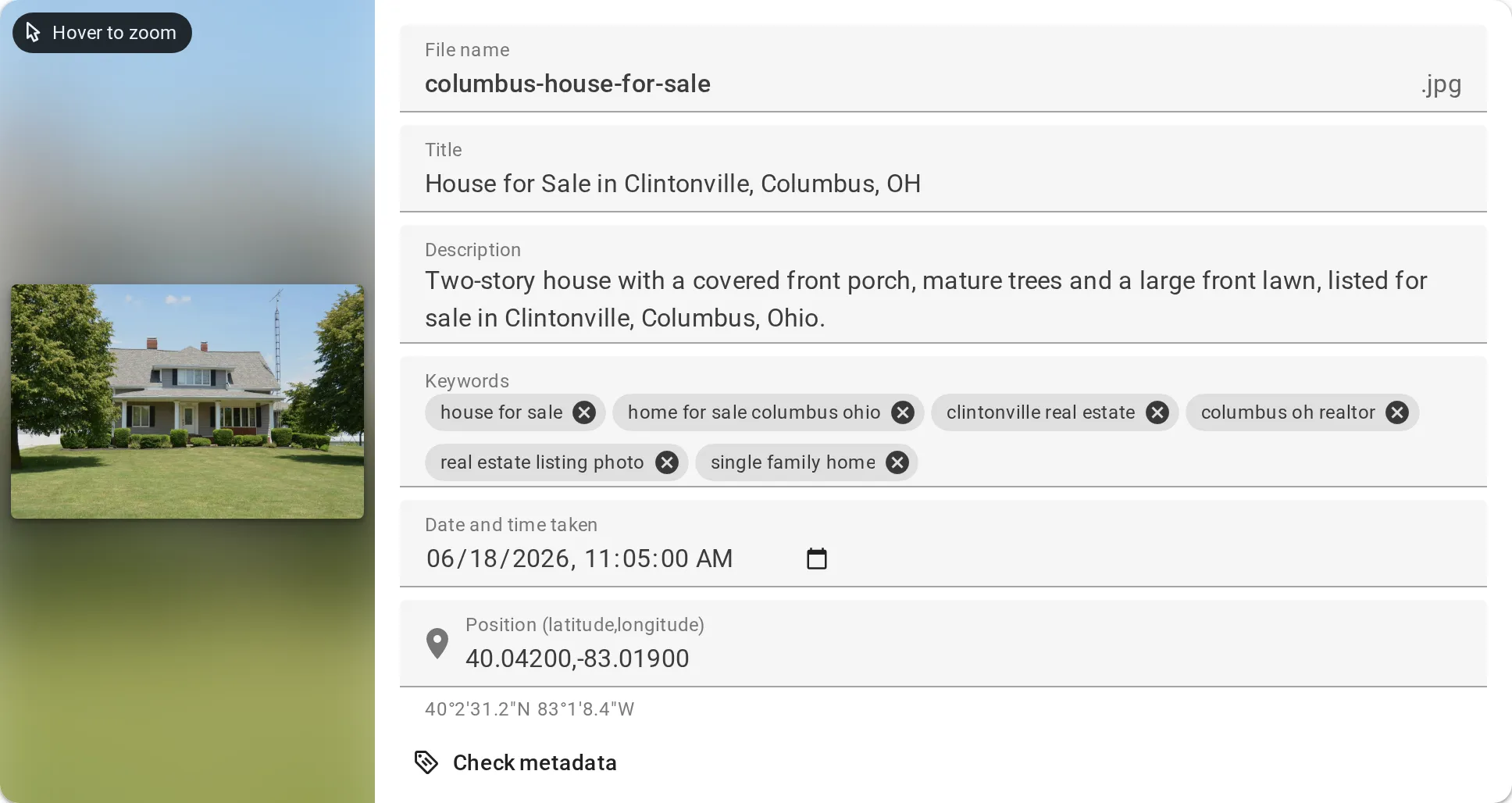
AI descriptions
Every photo described, keywords included
Tell the AI what matters, such as your business name and the service in the photos. It suggests a title, a description, keywords and a file name for each one, and writes the date taken if you want. Change anything before it goes into the files.
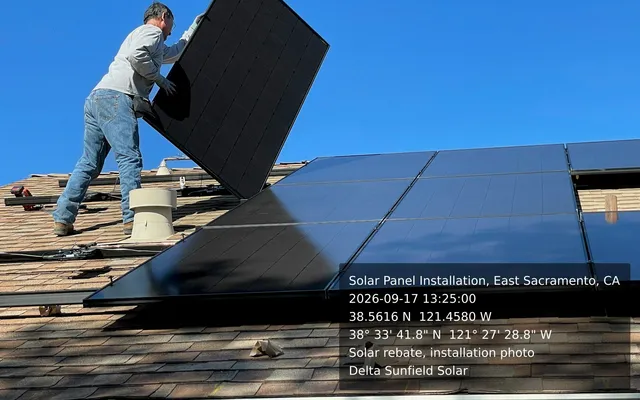
Stamps
Show where and when, right on the photo
Add a visible stamp with the photo title, the date taken, the coordinates and your own text. The preview shows exactly what each photo will look like. No stamp? Then your files stay as they are; only the metadata changes.
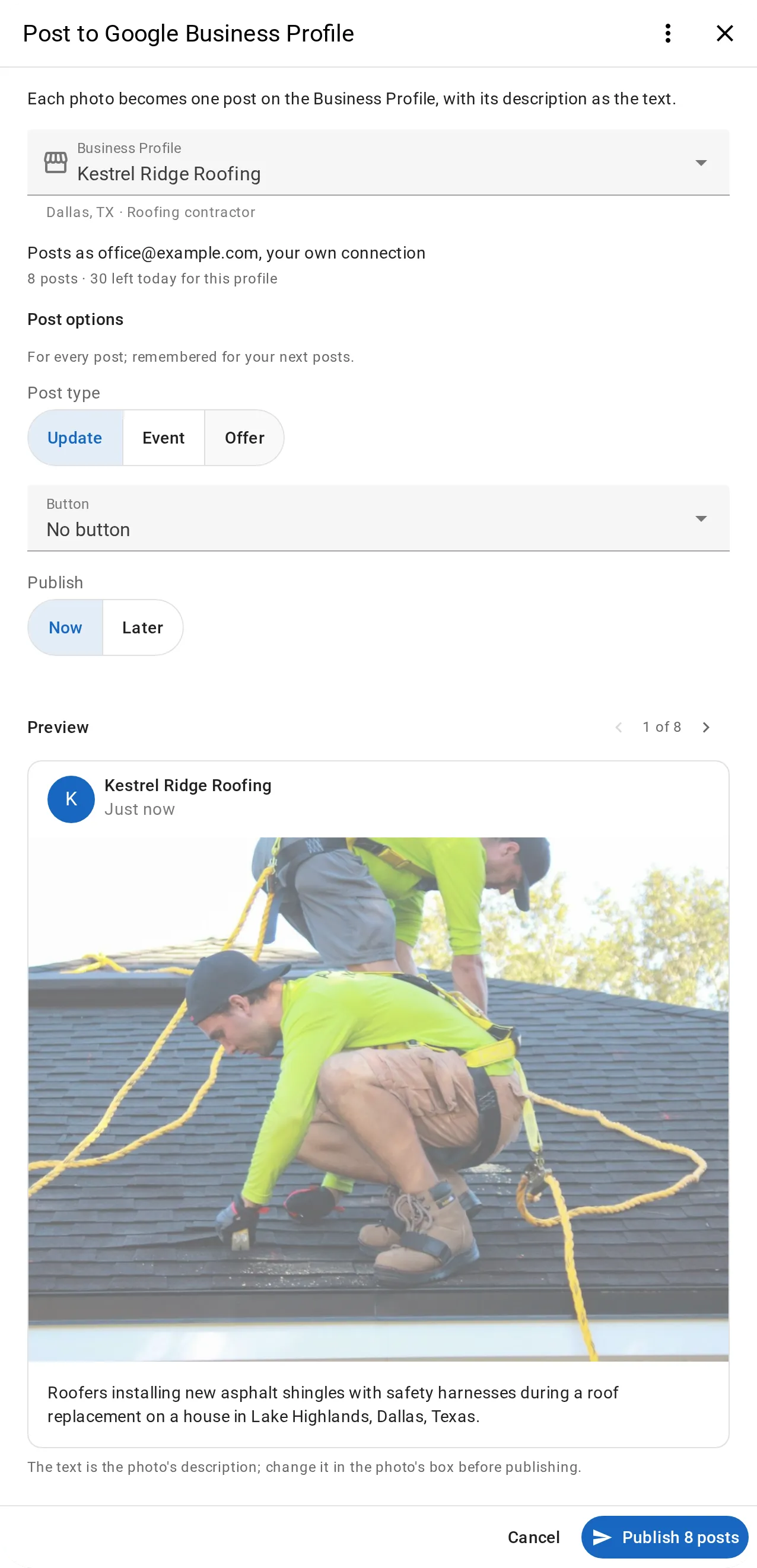
Google Business Profile
From geotagged photo to Business Profile post
Connect your Google account once, choose the profile, and see every post as Google will show it. Each photo becomes one post with its description as the text, published only when you click.

Teams
Bring your team, keep control
Buy seats for 2 to 100 people and add them with their Google email. Each person signs in with their own account, and you decide who can post to your Business Profiles.
Who uses GeoImgr
Local SEO and agencies
Geotag and describe photos of your clients’ businesses and post them to their Business Profiles.
Local businesses
Show customers where you work, with photos that carry your location and the words people search for.
Field inspections
Upload the photos of a site visit in bulk and stamp the place and date onto each one.
Two ways to geotag
GeoImgr has helped people geotag photos for over 10 years. GeoImgr AI, the new version, adds AI, videos and more. The tool you know stays available as GeoImgr Classic.
New
GeoImgr AI
AI titles, descriptions and keywords, up to 100 photos and videos at once, ZIP files, stamps, Business Profile posting and teams.
Classic
GeoImgr Classic
The geotagging tool many people have used for years, unchanged. Your Classic subscription keeps working there.
Over 10 years of geotagging
GeoImgr has been running, and getting better, for over 10 years.
Real people answer
Write to hello@geoimgr.com. We answer every email, usually within 24 hours.
Ready to geotag your photos?
Start with the free version, or try Pro free for 7 days.